
Review a guest’s ledger
Open Ledger from the main navigation. If your stay has multiple guests, select the guest whose records you want to review. The ledger shows scheduled charges, due dates, confirmed credits, pending entries, and remaining balances, along with a visual progress bar indicating overall payment health.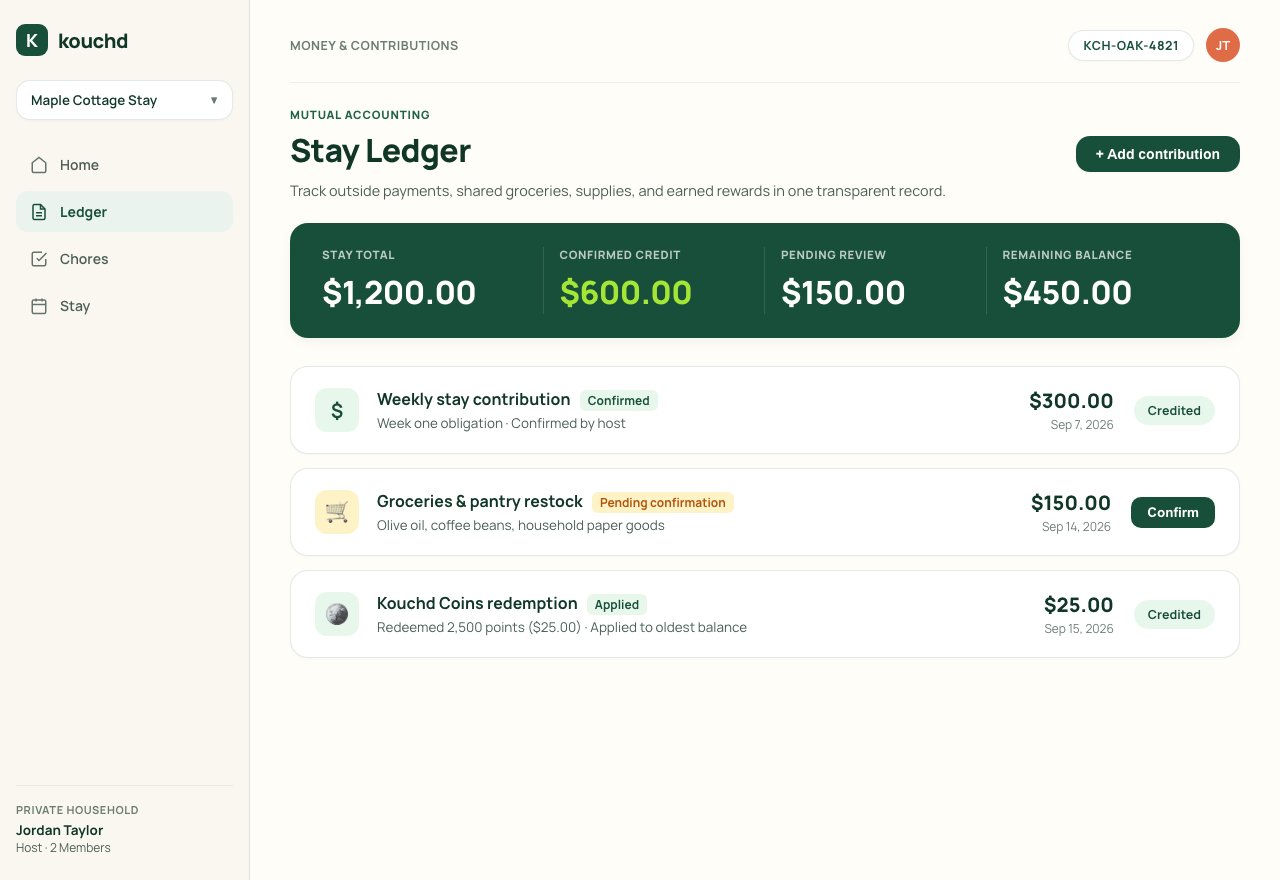
Confirm a contribution
When a guest sends a payment outside Kouchd or covers an agreed shared expense (such as groceries or home supplies), they record it by choosing Add contribution. A new entry stays pending until you review and confirm it.1
Review the pending contribution
Open Ledger and locate the entry tagged with Pending confirmation. Check the contribution category, reported dollar amount, date, and any attached note.
2
Verify outside receipt
Confirm that the funds arrived in your external payment account (PayPal, Cash App, Zelle, Apple Pay, or direct bank transfer) or verify the grocery receipt.
3
Confirm in Kouchd
Select Confirm. The status updates to Confirmed, and the credit is immediately applied to the guest’s oldest outstanding charge.
What if details do not match? If the amount, date, or category does not match what you received or agreed, do not confirm the entry. Leave it unconfirmed and discuss the transaction directly with your guest so they can record a corrected contribution.
On iPhone
On iPhone
- Tap Ledger. If you host more than one guest, pick the guest at the top.
- Under Contribution records, a guest’s pending entry shows Confirm and Dispute buttons. Tap Confirm when it matches what you received, or Dispute if it doesn’t, then talk it through.
- If a record was entered wrong, tap Void record and have it recorded again correctly.
- On a charge with a late fee, tap Waive late fee.
Add or adjust a charge
Hosts can also add or adjust charges directly on the ledger to reflect mutual agreements made during the stay:- One-time household charges: If you agreed to split a utility bill, an unexpected repair, or bulk household supplies, select Add charge, enter the amount, and include an explanatory note.
- Cancel a one-time charge: If a charge was entered by mistake or resolved outside the ledger, you can cancel it with a note.
- Waive a late fee: If a guest was delayed in paying due to agreed circumstances, locate the fee on the ledger and select Waive fee.
Pricing, payment timing, and terms
Configure guest rates, late fees, and grace periods.
Logging contributions
See how guests record outside payments and track status.