
Pay your host outside Kouchd
Outside payment methods: Open Stay to view the direct payment handles your host provided for PayPal, Cash App, Zelle, or Apple Pay. Always verify account handles before sending money.
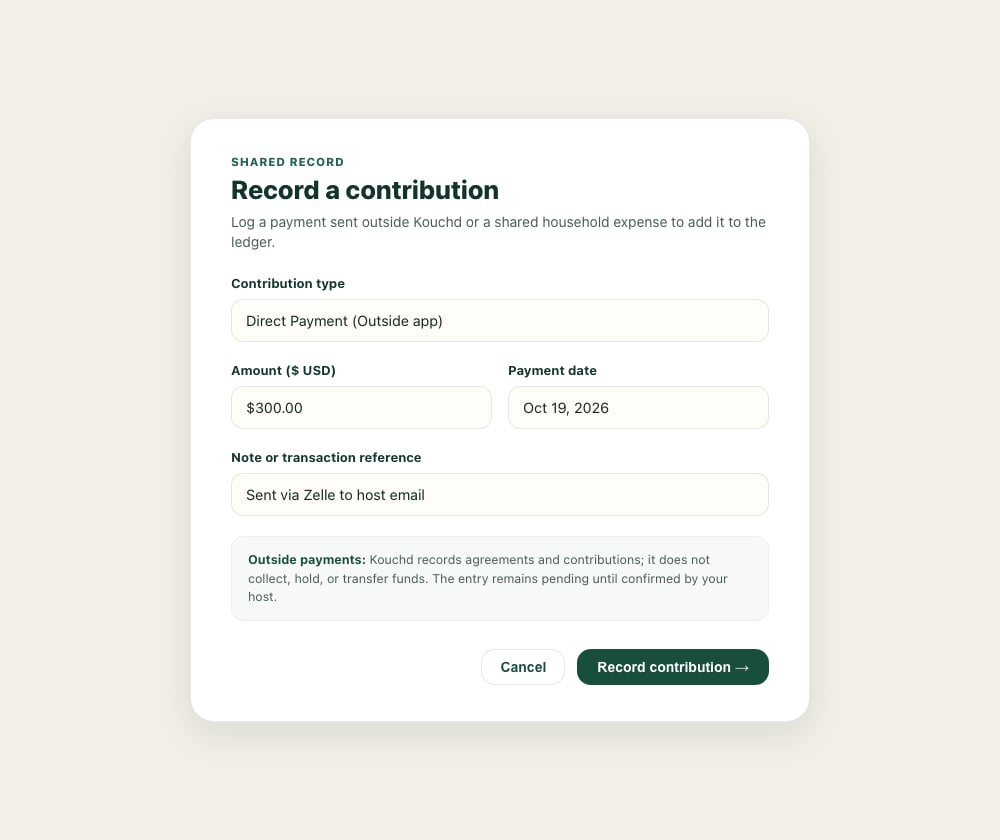
Record a contribution
1
Open Ledger and select Add contribution
Navigate to Ledger in your app navigation and select the + Add contribution button.
2
Choose contribution category
Select the category that best describes your contribution:
- Direct payment: Money sent via PayPal, Cash App, Zelle, Apple Pay, or cash.
- Groceries & pantry: Shared food or kitchen restocks agreed with your host.
- Household supplies: Cleaning supplies, paper towels, or household staples.
- Other agreed help: Special shared costs discussed with your host.
3
Enter amount and date
Enter the exact dollar amount and select the date the payment was sent or the purchase was made.
4
Add a note and submit
Add an optional note (such as “Week 2 contribution sent via Zelle”) to help your host quickly identify and verify the transaction. Select Record contribution.
On iPhone
On iPhone
- Tap Ledger, then tap Record a contribution (or +).
- Choose a Type: Outside payment, Groceries, Supplies, House work, or Other.
- Enter the amount in dollars and an optional note.
- Leave Count toward balance on if it should reduce what’s owed, then tap Record.
Understanding status transitions
- Pending confirmation: The entry is logged on your ledger and is visible to your host. Pending entries do not count toward confirmed progress until your host reviews them.
- Confirmed: Your host has verified the outside payment or purchase receipt. The credit is immediately applied to your oldest outstanding obligation.
- Unconfirmed or mismatched entries: If an entry’s details require adjustment, leave it unconfirmed and coordinate with your host to re-record the contribution with the agreed amount and date.
Reading your progress display
The progress bar on Home and Ledger shows the confirmed credit against scheduled charges, along with your remaining balance and upcoming due dates.Credit priority: Once confirmed, contributions automatically apply to your oldest outstanding obligation first to keep payment accounting straightforward.
Quickstart guide
Overview of household setup and contribution tracking.
Kouchd Coins and house rewards
Earn ledger credits through approved chores and household tasks.
Pricing, payment timing, and terms
Understand rates, grace periods, and late fees.
Privacy, data, and security
Review visibility and bilateral ledger access boundaries.